
Published by your BAS Agent team | Helping you update ABN details | Australian Business Register (ABR) Guidance
Your Australian Business Number (ABN) is more than just a number on your invoices — it’s the identifier the government uses to communicate with your business. If you need to update ABN details, whether you’ve moved premises, changed your business structure, or simply updated your phone number, keeping your information current with the Australian Business Register (ABR) is a legal obligation that many business owners overlook. In this guide, we’ll walk you through why it matters, what you need to update ABN details for, and exactly how to do it — step by step.
Why Updating Your ABN Is a Legal Requirement
Under the A New Tax System (Australian Business Number) Act 1999, ABN holders are legally required to notify the ABR within 28 days of any change to their registered details. This includes changes to your:
- Business name
- Business address (physical and postal)
- Email address and phone number
- Business structure (e.g., sole trader to company)
- Authorised contacts who can act on your behalf
Failing to update these details isn’t just an administrative oversight — it can have real consequences for your business, including missed government grants and support programs, incorrect details appearing on the ABN Lookup tool (used by other businesses and government agencies to verify your ABN), and delays or issues when applying for finance, tenders, or licences.
Source: Australian Business Register — ABR FAQs
What Details Must Be Kept Current?
The ABR holds a range of information about your business. It’s important to update ABN details for each of the following:
- Authorised contacts: The people who can make changes or enquiries on behalf of your business.
- Physical business address: This must be your actual place of business — not your tax agent’s or BAS agent’s address.
- Postal address: Where you receive correspondence from government agencies.
- Email address: Used for important notifications, including ATO communications.
- Phone number: Ensures government agencies can reach you directly.
- Business structure: Sole trader, partnership, company, or trust — this must reflect your current operating structure.
Source: ABR — Updating your ABN information
Reviewing Your Business Structure Before You Update
Before making changes to your ABN, it’s worth taking a moment to review whether your current business structure still reflects how you operate. Here’s what to consider:
- Do you have multiple ABNs? Some businesses have accumulated more than one ABN over time. Any ABN that is no longer in use should be cancelled.
- Has your structure changed? If you’ve moved from operating as a sole trader to a company or trust, the old ABN must be cancelled and a new one applied for under the new entity.
- Speak with your TAX agent before making structural changes — they can help confirm the right course of action and ensure your tax obligations are met before any cancellation.
Source: ATO — Change your business structure
How to Update ABN Details Online: Step-by-Step
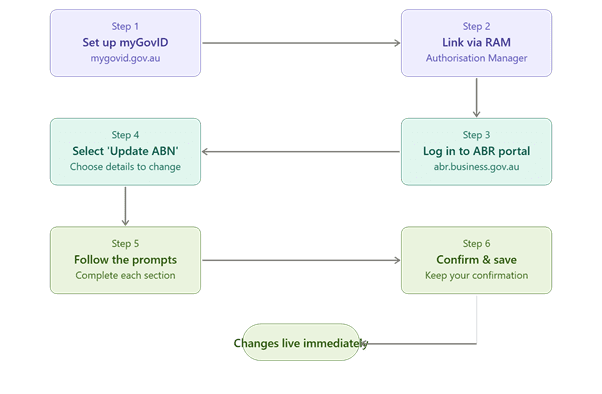
The fastest and most reliable way to update your ABN is through the ABR’s online portal. Here’s how:
- Step 1 — Set up myGovID — If you haven’t already, download the myGovID app and verify your identity. myGovID is the Australian Government’s digital identity credential required to access business services online. Visit: mygovid.gov.au
- Step 2 — Link your business via RAM — The Relationship Authorisation Manager (RAM) allows you to link your myGovID to your business ABN and manage who has authority to act on behalf of your business. Visit: authorisationmanager.gov.au
- Step 3 — Log in to the ABR portal — Go to abr.business.gov.au and log in using your myGovID credentials.
- Step 4 — Select ‘Update ABN record’ — Navigate to the update section and select the details you need to change.
- Step 5 — Follow the prompts — Complete each section as required to update ABN details. Changes take effect immediately upon submission.
- Step 6 — Confirm and save — Review your updated details, submit, and keep a record of the confirmation for your files.
Source: Australian Business Register — Update your ABN | myGovID | Relationship Authorisation Manager (RAM)
Can Your BAS Agent Update Your ABN for You?
Yes — and this is often the quickest option for busy business owners. Registered BAS agents can update your ABN details on your behalf through the ATO’s Tax Professional Services portal using their own myGovID credentials. Any changes made through this pathway take effect immediately.
This is a legitimate and authorised service. BAS agents are registered with the Tax Practitioners Board (TPB) and are authorised to manage ABN-related matters as part of their BAS services scope.
Sources: ATO — Update your ABN details | Tax Practitioners Board (TPB)
What Happens If You Don’t Update Your ABN?
Many business owners don’t realise the downstream impact of outdated ABN records. Here are some real risks:
- Missed grants and stimulus payments: During events like COVID-19, the government distributed support payments based on ABR data. Businesses with outdated or incorrect information were at risk of missing out.
- ABN Lookup errors: Other businesses and clients use the public ABN Lookup tool (abr.business.gov.au) to verify your details before engaging with you. Incorrect details can undermine trust.
- Failed identity verification: Many government online services use your ABR details to verify your identity. Outdated information can cause access issues.
- ATO compliance risk: If the ATO or ABR cannot contact you using registered details, it may affect your compliance standing.
Source: Australian Business Register — ABR FAQs
When Should You Cancel an ABN?
You must cancel your ABN if your business has ceased trading and you have met all of your tax obligations. You should also cancel any ABN associated with a business structure that no longer exists (for example, if a partnership has dissolved).
Importantly, you should not cancel your ABN until all outstanding tax lodgements (BAS, income tax returns, etc.) are complete and any liabilities are settled. We recommend speaking with your BAS agent before cancelling to ensure you’ve met all obligations.
Source: ABR — Cancel your ABN
We’re Here for You
Keeping your ABN accurate is straightforward once you know how — but if you’re unsure about your business structure, have multiple ABNs, or simply want to make sure everything is in order, we’re happy to help.
Need help to update your ABN details? As registered BAS agents, we can update ABN details, review your records, and advise you on the right structure going forward.
Disclaimer: This blog is intended as general information only and does not constitute professional tax or legal advice. Please consult a registered BAS agent or tax professional for advice specific to your circumstances.
Need help?
Get in touch with our team today — don’t risk missing out on government support or creating compliance issues for your business.